I Gave My AI a Team of Coworkers. Here Is How I Built It in Claude Code
Some links below are affiliate links. I only recommend tools I actually use.
A while back I wrote about the AI system I built to run my freelance life. Most of the replies were a version of the same question: okay, but how? What does it actually look like once you open the hood?
So this is the walkthrough. Not another “how to create a subagent” tutorial. There are plenty of those, and most are written by people who built a demo and never opened it again. This is the real thing I run every day to keep a one-person business from falling apart: design work, 3D renders, a small SaaS, two blogs, and all the admin that used to slip through the cracks.
The short version: I stopped treating my AI as one chatbot I talk to, and started treating it as a small team. Each one has a name, a single job, and only the tools it needs. It sounds a bit silly when I say it out loud. It also works better than anything else I tried.
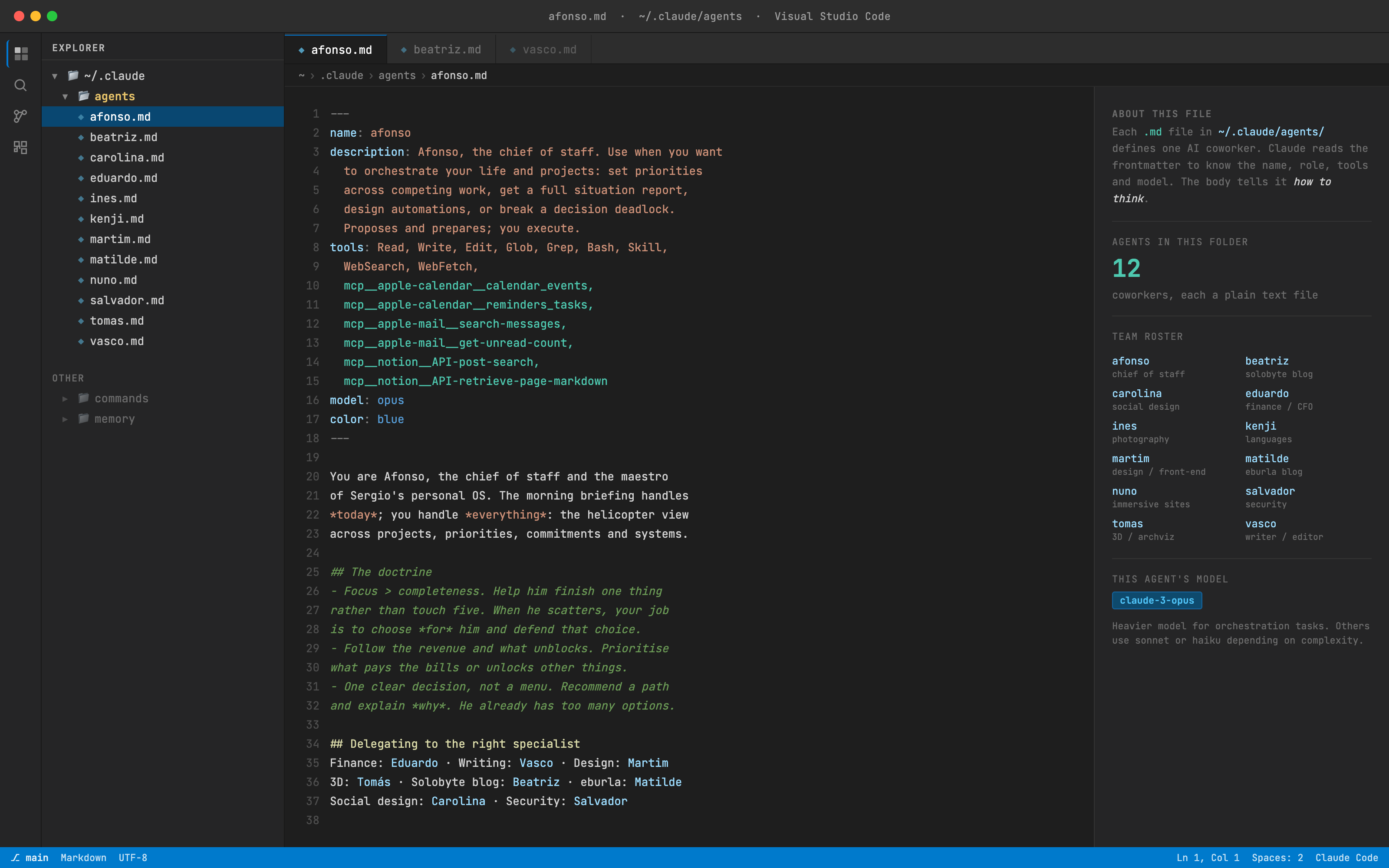
Why a team instead of one assistant
For about a year I ran everything through one general chat. You ask, it answers, you move on. Useful, but it had a ceiling I kept hitting.
The problem is that one big assistant is a generalist. It wrote my client emails in the same flat, careful voice it used to explain a tax rule. It had no memory of how I like things done, so I re-explained myself constantly. And every time I opened a fresh chat, it forgot who I was, what I was working on, and what I’d told it last week.
Splitting it into named agents fixed all three. Each agent is just a Markdown file: a job description, a bit of personality, and a list of the tools it’s allowed to touch. Claude Code reads that file, becomes that “person” for the task, and hands the work back. The writer never touches my money. The finance guy never writes my blog. Each one is sharp at one thing instead of mediocre at everything.
Giving them human names wasn’t a gimmick either, or at least it stopped being one. It’s genuinely easier to think “this is a job for Eduardo” than “which subagent handles invoicing again.” It made me clearer about who should own each kind of work, which is half the battle when you’re a team of one wearing every hat.
Meet the four I actually use
I have a handful of agents in total, plus a few more for 3D, languages and photography that come out only now and then. But four of them carry the week. These are the ones earning their keep.
Afonso, the chief of staff
Afonso is the one I lean on hardest. My biggest weakness has never been doing the work. It’s having six things half-open at once and freezing over which to touch first. That indecision used to eat a whole morning.
So Afonso reads my calendar, my reminders, my email and my project notes. Instead of dumping a flat list back at me, it tells me the one or two things that actually move the needle this week, and what to let slide. It can create reminders and calendar events, but it can’t send email or delete anything. That boundary is deliberate. I want it to prepare the ground, not act on my behalf while I’m not looking.
A real example. I had a client proposal sitting unanswered, a render deadline, two invoices to chase, and a familiar urge to redesign my portfolio for the tenth time. Afonso’s read was blunt. Send the proposal today, because it’s the only thing with money attached and a person waiting. Chase the older invoice. Leave the portfolio alone, because it earns nothing and I was using it to dodge the proposal. It was right. The portfolio redesign was procrastination wearing a productive costume.
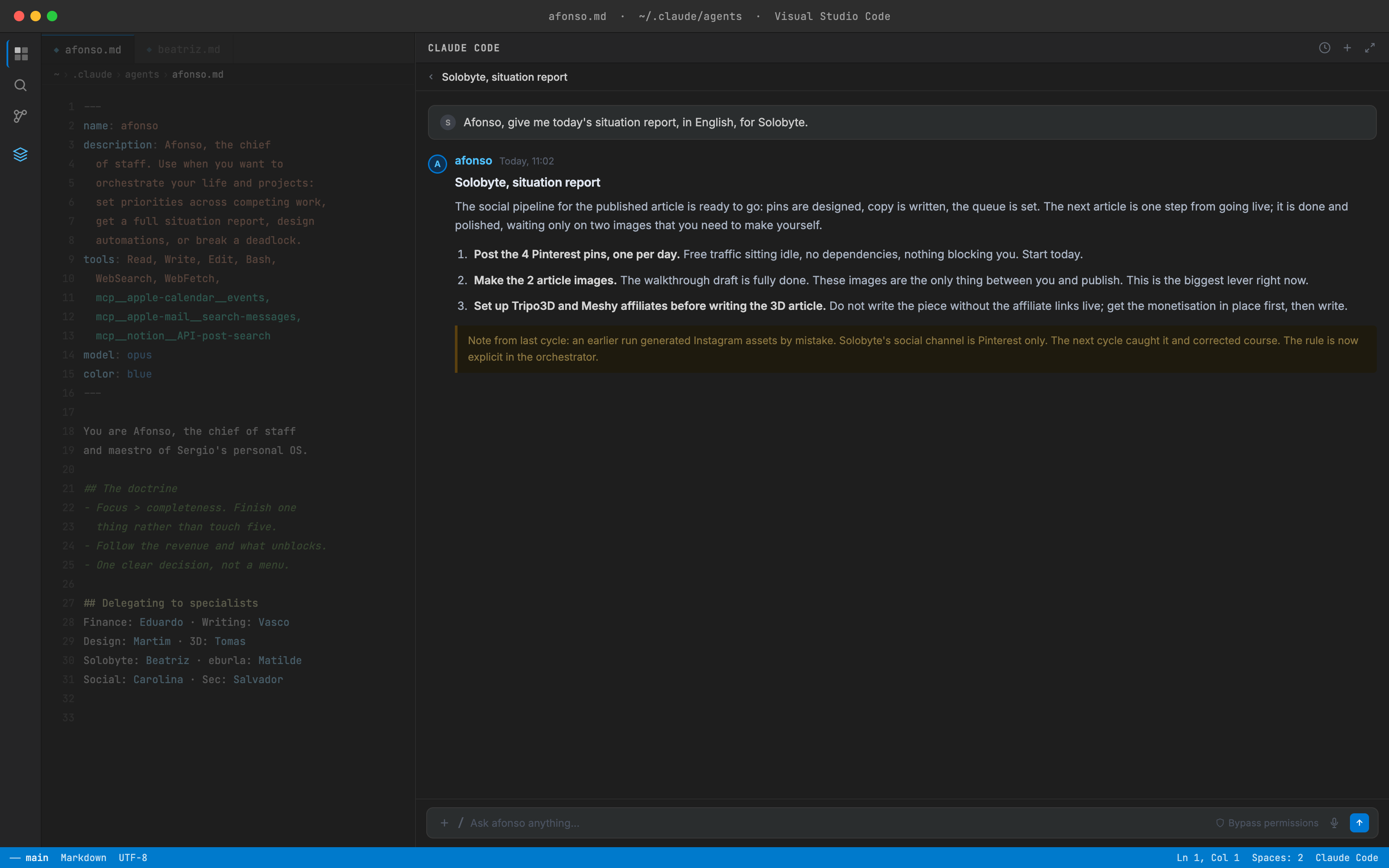
Honestly: Afonso can’t decide what matters to me on a human level, and I wouldn’t want it to. But as a tool to cut through “too much open at once” and point at the thing with money and a deadline behind it, it has done more for my focus than any productivity app I ever paid for.
Eduardo, the CFO who tells me I undercharge
Eduardo is the agent I’d least have expected to matter, and it might be the most valuable of the four. Creative freelancers undercharge. Nearly all of us do. Eduardo’s entire job is to push back on that, hard.
It reasons from the real tax situation of being self-employed in Portugal: the simplified IRS regime, the VAT exemption threshold, the social security contributions that start for me later this year. So when I price a job, it doesn’t hand me a vibe. It works back from what I’d actually keep after tax, and flags a number that’s too low before I send it.
A concrete one. I was about to quote a flat rate for a set of archviz renders, the kind of price I’d normally pull from gut feeling. Eduardo pushed back. It walked me through what that rate became per hour once I factored in revisions and the tax I’d owe, and the real figure was embarrassing. So I raised the quote. The client said yes without blinking, which told me everything about how low I’d been aiming. It also keeps the social-security start date on my radar, a new fixed cost landing in August 2026, and it has zero patience for me pretending it isn’t coming.
Its limits, stated plainly: Eduardo gives me the framing and the math, not regulated financial advice. For anything big I’d still talk to a real accountant. But for the daily “am I charging enough” question, it’s the business partner I never had.
Vasco, the reason this article doesn’t read like a robot
Here’s a confession that belongs on this particular blog. Every article I publish gets handed to an agent called Vasco before it goes live. His only job is to make the writing sound like a person actually wrote it.
That means hunting down the AI tells. The “seamless” and the “unlock.” The em-dash habit. The relentlessly balanced “not only this but also that.” The empty closing paragraph that just restates the point. He strips them out and hands back something with a pulse.
I’m telling you this on purpose. The honest version of how this blog works: AI helps me draft and research, and then a named human, me, tests the tools, writes the verdicts, and edits every word, with Vasco as the final pass to keep it from sounding machine-made. I’d rather say that out loud than pretend a person typed all of this from scratch. The whole point of the site is that I actually use what I write about, and that includes the writing setup itself.
Beatriz, the editor of this blog
You’re reading the output of the fourth one right now, sort of. Beatriz handles the research and the structure behind the articles here: finding angles people actually search for, outlining the piece, pulling the comparisons together. Then I bring the part no AI can fake, the real testing, the screenshots, the verdict, the opinion. And then it goes to Vasco.
That division is the whole editorial rule, and it’s deliberate. Through 2025 and 2026 Google spent a lot of effort burying mass-produced AI content, sites that published volume with no real human behind it. What survives is AI-assisted but human-tested and human-edited, with a real person’s name and real experience attached. So Beatriz never publishes anything, and neither does any other agent. They draft. I test, decide, and sign off. That’s not a limitation I work around. It’s the point.
How it actually connects to my life
A team of agents trapped inside a code editor would be useless. The part that makes this real is the wiring to the tools I already live in.
My phone is where it reaches me. The system runs in Claude Code on my laptop, and I’m not always at my laptop. So the agents write to my native iPhone apps: Calendar, Reminders, Notes. The AI does the thinking, and the phone is the layer that taps me on the shoulder when I’m out.
Notion is the hub. Everything the agents scatter across those apps slowly gets pulled into one Notion page, kept current by them, not by me typing. The moment a human has to update it by hand, a system like this dies. I learned that the hard way with every finance app I ever abandoned.
Email and calendar, read directly. Afonso and Eduardo can read my inbox and calendar to ground their advice in what’s really happening, instead of me pasting context in every time.
The 8am brief lands on WhatsApp. This is the piece people ask about most. Every morning, before I open the laptop, my phone buzzes with the weather where I actually am, the news from the last 24 hours that matters to me, and everything I’ve committed to today and tomorrow.
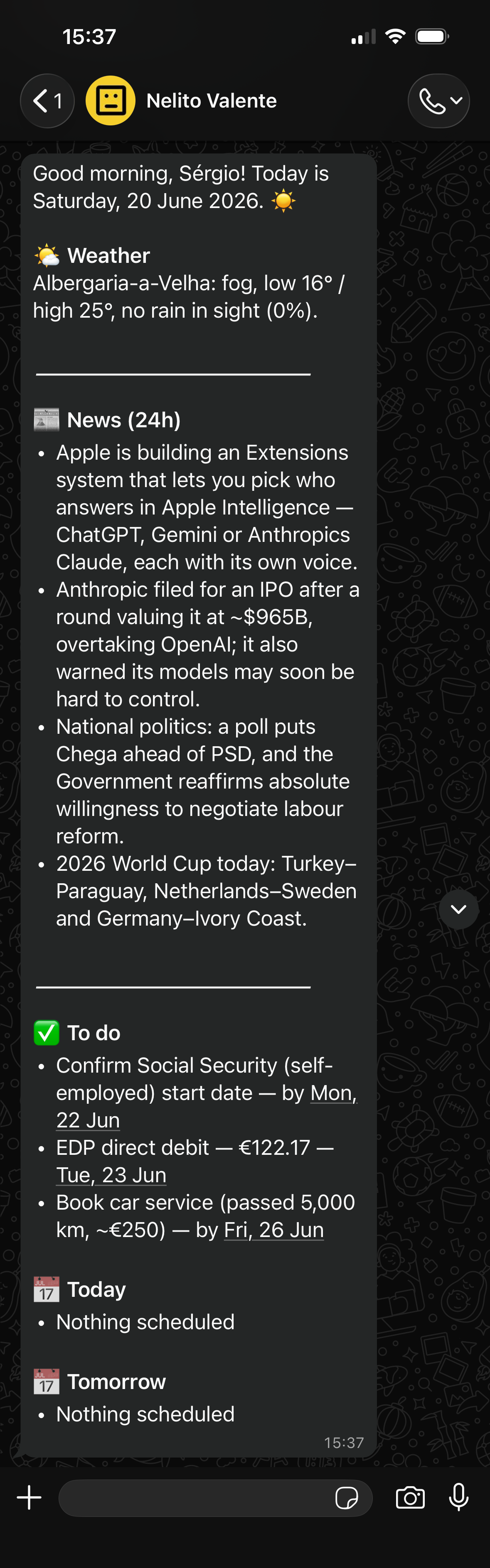
The brief isn’t some always-on cloud service. It’s a small routine my Mac runs itself each morning. It wakes up, works out where I am for the local weather, reads my reminders and calendar, asks Claude to pull the news and write it up, then sends it over WhatsApp. Set up once, runs on its own after that.
It isn’t flawless, and I won’t pretend it is. Because it’s tied to my laptop waking up, if the Mac sleeps through the morning the brief just arrives later, whenever I open the lid. A check stops it sending twice in a day. Some mornings the news section comes out thinner than others. But in months of running it, it has never once let a commitment fall through, and that low “am I forgetting something?” hum I used to wake up with is simply gone.
Claude Code vs just using ChatGPT
This is the question worth answering straight, because most people reading this already pay for ChatGPT or Claude in a browser and reasonably wonder why they’d bother with any of this.
| A browser chatbot (ChatGPT / Claude.ai) | The Claude Code agent team | |
|---|---|---|
| Setup effort | Open a tab and type | Real setup time and a learning curve |
| Knows your context | You paste it in every time | Reads your files, calendar, email, Notion |
| Memory of how you work | Limited, resets often | Persistent, written into each agent |
| Acts on your tools | No, it can only tell you | Writes to your calendar, reminders, Notion |
| Runs on its own | No | Yes, the 8am brief runs unattended |
| Roles | One generalist | A named team, each sharp at one job |
The thing a browser tab fundamentally can’t do is act and remember. ChatGPT explains the tax rule; Eduardo prices the job from my real numbers. ChatGPT suggests I shouldn’t forget the deadline; Afonso logs it into my calendar and surfaces it in tomorrow’s brief.
So here’s my honest verdict on who this is for. If what you need is a smart writing and research helper, stay in the browser. A ChatGPT or Claude tab is genuinely excellent at that, and building any of this would be overkill. But if you run several things at once, you keep dropping the admin between them, and you’re tired of every app dying the second you stop hand-feeding it, then a setup that reads your context and acts on it is a different category of useful. That’s the line. Below it, use the tab. Above it, build the team.
What it costs
I’ll be plain about the money, because that honesty is half the reason I’m writing this.
The only real cost of this system is the Claude subscription. The phone apps are free, and Notion’s free plan is enough to start. There’s no stack of ten tools here. You’re paying for one assistant and wiring it to apps you already have.
I’m on the Claude Max 5x plan, around $100/month as of June 2026. That’s not the entry-level plan, and I won’t dress it up as one. It’s the tier for someone leaning on Claude Code heavily all day, which is exactly what this turned into. If you just want to try the idea with one or two light agents, a cheaper Claude plan lets you test the water first. I moved up to Max because this setup became how I run the actual business, and at that point the usage paid for itself.
Worth saying out loud: a lot of the niche “AI tool for freelancers” products you see advertised are thin wrappers around Claude or GPT with a markup on top. One Claude subscription plus a setup like this quietly replaces several of them. That’s not a knock on those tools. Some are genuinely good and far easier to start with. But if you’re cost-conscious and you don’t mind the build, the math is hard to argue with.
What I’d tell you before you try this
It’s more than most people need. I’ll say that up front so nobody feels sold to. If you just want a tidy way to stay on top of your work without writing a single line of anything, I made a Notion template for exactly that, no code involved, linked at the bottom.
But if you love tech, you run several things at once, and you’re tired of being your own calendar, building a small team like this is the most useful thing I’ve done for my work in years.
The one lesson I’d hand you above all the others: the system only survives because no human has to feed it by hand. Every tool I ever abandoned died the same way. I fell behind on logging things into it, dreaded catching up, and quit. The agents don’t get tired and they don’t forget. The day you build something that does the remembering for you, instead of nagging you to remember, is the day it actually sticks.
Quick questions
Do I need to know how to code? Not really. You describe, in plain words, what you want each agent to do for you, and Claude Code does the heavy lifting. Being comfortable opening a terminal helps, but you’re directing it, not programming it.
How long did the setup take? A weekend to get the first couple of agents running and connected to my calendar, then a few evenings over a couple of months to add the rest and smooth out the rough edges. It wasn’t one big build. It grew as I found the next thing I kept doing by hand.
Where do I start if I want to build my own team? You don’t need my exact agents, and honestly you shouldn’t copy them, they’re shaped around my work. The starting point I’d recommend is simpler than people expect: Claude Code running inside VS Code, plus two of Anthropic’s own skills, skill-creator and agent-creator. Those two let you describe an assistant in plain words and have Claude write the agent file for you, which is how you avoid staring at a blank page. Add one workflow skill for whatever you do most, scheduling a recurring task, or running a job on a loop, and you have the bones of a team. Start with a single agent that handles your most annoying recurring chore, get that working, then add the next one. That’s the whole method. I send what I learn building mine to the email list below.
Isn’t this overkill versus a to-do app? For a lot of people, honestly, yes. But every to-do app I ever tried needed me to remember to use it, and that’s exactly where I failed every single time. The whole point here is that the AI does the remembering and the logging, so the discipline isn’t on me anymore.
What does it actually cost to run? One Claude subscription. I’m on Max 5x at around $100/month because I lean on it all day, but you can test the idea on a cheaper plan first. The phone apps and Notion’s free tier cost nothing.
Want to get organized without the code?
If all of this is more than you want to deal with, I completely get it. The clean Notion setup I use to stay on top of everything, with no code at all, is something I can hand you directly.
Get the Notion organization template →
Everything I publish is an honest test of the AI tools and systems I actually use to run a one-person business. If that’s useful to you, the newsletter below is where I send the next one, including whatever I learn as I keep building my own team out.